Launch a new website and the first question is always the same: how do I get on Google? Search for advice and you will find a hundred lists of "ranking secrets", most of which are either obvious or out of date.
Here is the honest version. SEO for a new site is mostly dull work done consistently. A few things matter a great deal, a lot of things matter a little, and almost nothing happens overnight. This is how I would spend the first ninety days, in order, with the reasons behind each step.
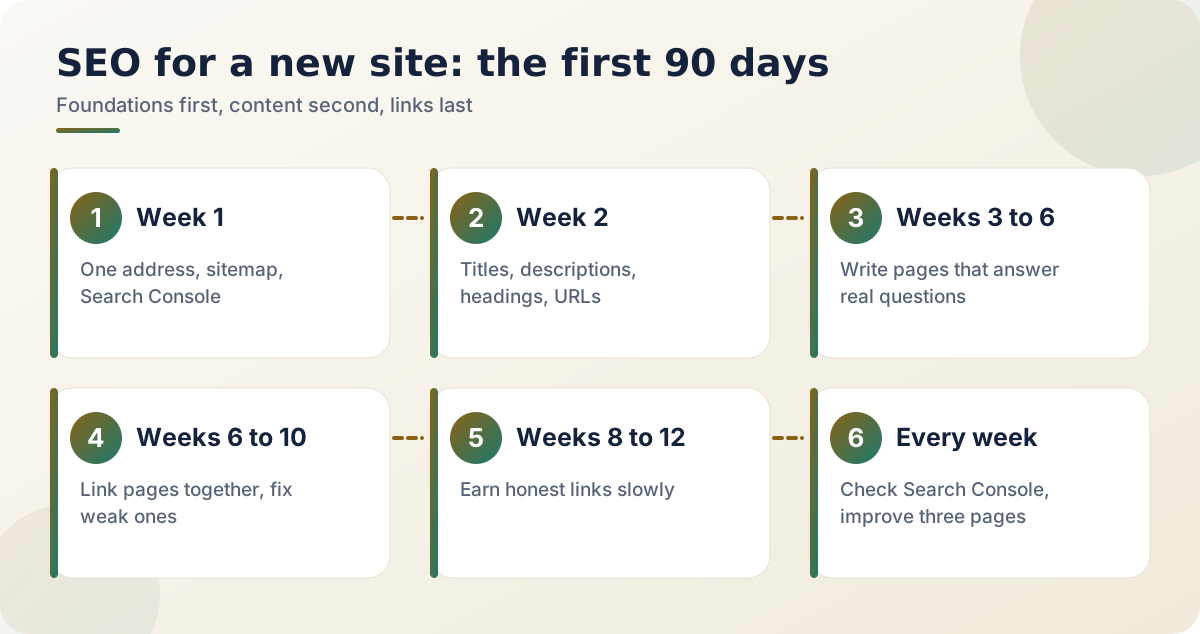
Part 1: Week one, let Google find you
Start with the foundations, because nothing else works without them.
- Choose one version of your address. With www or without, then redirect the other to it. Use HTTPS everywhere. The canonical tag on every page should point to the same version you redirect to. If the canonical says one thing and the redirect says another, search engines get confused, and I have seen real sites make exactly this mistake.
- Create a sitemap and check robots.txt. The sitemap usually lives at /sitemap.xml. Open robots.txt and make sure it does not block the whole site. A "temporary" block is easily left on after launch.
- Add the site to Google Search Console. It is free and it is the only place where Google tells you directly what it thinks of your site.
- Submit your sitemap and ask for indexing of your most important pages, one at a time.
Part 2: Week two, the basics on every page
| Element | What to do | Why it matters |
|---|---|---|
| Title | Unique, 50 to 60 characters, main idea first | The strongest on-page signal and the headline in results |
| Meta description | About 120 to 158 characters | Decides whether someone clicks |
| Main heading | One h1 that matches the page | Tells readers and crawlers what the page is about |
| Address | Readable, like /blog/how-to-read-a-contract | Easier to share and understand |
| Images | Descriptive file names and alt text | Helps screen reader users and image search |
If you have thirty pages and twenty-five share the same title, fix that before anything else.
Part 3: Weeks three to six, write what people search for
This is the part no tool can do for you. Pages that rank usually do one of three jobs well.
- Answer a specific question completely. Not "everything about Android" but "how to sign an AAB without a computer".
- Explain something from real experience. What you did, what went wrong and what you would change. This is hard to fake, and readers can tell.
- Compare options honestly, including the downsides.
Before you write, search the question yourself and look at what the first page offers. Ask what you can add that is more complete, more current or more practical. If the honest answer is nothing, pick another topic. Then write for one reader with one problem, and check at the end whether they could leave your page with that problem solved.
Part 4: Weeks six to ten, connect the pages
Link related pages to each other using descriptive words, like "our guide to publishing on Google Play", never "click here". It helps readers and shows search engines how your topics fit together. Look in Search Console for pages that get impressions but few clicks, because they usually need a better title or description. And update old posts when facts change. A tutorial that is two years out of date quietly loses trust.
Part 5: Weeks eight to twelve, earn links slowly
Links from other trustworthy sites are still one of the strongest signals, and they are also the hardest thing to get. This is where shortcuts hurt the most.
The honest routes are slower but they last. Put your site address on your social profiles, developer pages and professional listings. Publish something people genuinely want to cite, like a checklist, a free tool or original data from your own work. Write a guest article for a site your readers already visit. Answer questions in communities you actually belong to, and link only when it truly helps.
Speed and phones
Most visitors arrive on phones, often over slow connections. Compress your images, skip heavy scripts you do not need, and test pages on a mid-range handset. A page that takes ten seconds to load loses people before they read a word, and the reports in Search Console show where the problems are. Our post on offline-first apps for slow networks explains the same mindset for apps.
What to ignore
Keyword stuffing, where you repeat a phrase until the text sounds like a robot wrote it, does not help and often hurts. Chasing every rumour about an algorithm update wastes energy. A pile of thin, copied pages loses to a few good ones. And expecting results in a week is the surest way to quit too soon.
Frequently asked questions
How long does it take to appear on Google?
A new site commonly takes days to weeks to be indexed properly and months to build real visibility. Submitting a sitemap in Search Console helps Google find you sooner.
Do I need a blog to rank?
No, but regular useful pages give you more chances to match real questions. Quality and usefulness matter more than volume.
Are keywords still important?
Yes, in the sense that your page should clearly use the words people search with. Repeating them unnaturally does not help.
Should I pay for SEO services?
Be careful. Anyone who promises a guaranteed first-page position is not telling the truth. Good help explains what they will change and why.
Measure a little, not constantly
Look at Search Console once a week, not once an hour. The numbers that matter are impressions, clicks, average position and the queries that bring people in. Pick the three pages closest to page one and improve those first. Small steady gains on pages that already have a foothold usually beat starting something new.
Official resources
Related reading
- Google-এ সাইট খুঁজে পাওয়ানোর সহজ ধাপ (বাংলা): the same ideas, in simple Bangla
- Why I build offline-first apps for slow networks: why fast pages on slow networks win
- How to publish your first Android app on Google Play: linking your site to your app listing
The sites that rank well a year from now are not the ones that found a trick. They are the ones that kept publishing useful things while everyone else gave up after a month.