AdMob is the easiest way for a small developer to earn something from a free app. It is also one of the easiest ways to lose a Google account. The money is modest at the start, the rules are strict, and the punishments for breaking them tend to be harsh and often final.
I have run ads in apps for years, across more than one account, so this guide is built around the things I wish I had read before my first ad request: how the money really works, where ads can go without annoying people, and the mistakes that get accounts limited or closed.
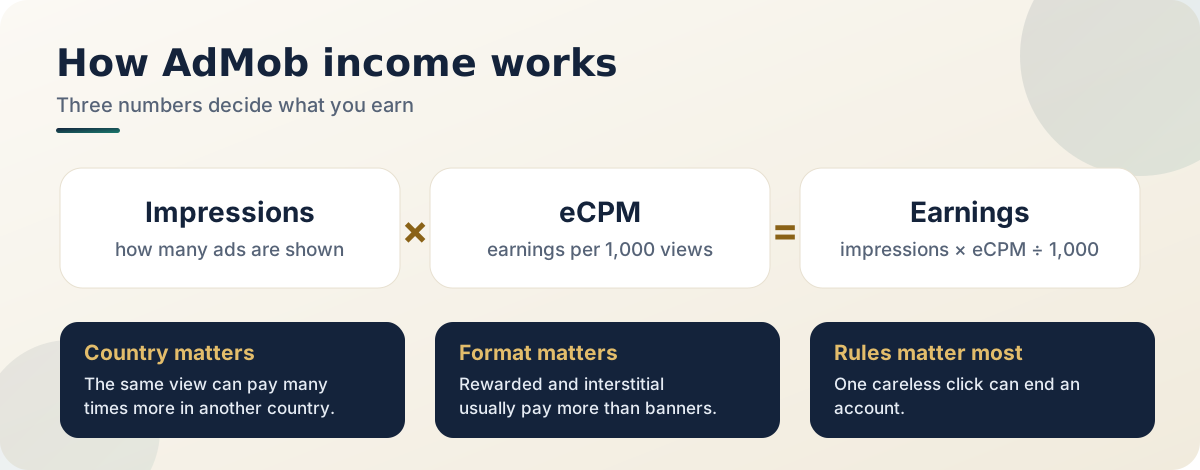
Part 1: How the money actually works
Three numbers decide your income. Impressions are how many times an ad is shown. eCPM is what you earn per thousand impressions, and it swings a lot by country, format and season. Fill rate is how often a request actually returns an ad.
An app with ten thousand daily users in a low-eCPM region can earn far less than the same app with two thousand daily users somewhere advertisers pay more. That is not unfair, it is simply how the advertising market works, and it is a good reason not to plan your life around early numbers.
Part 2: Choose formats that respect people
| Format | What it is | Honest advice |
|---|---|---|
| Banner | Small strip, always on screen | Easy and low-paying. Keep it away from buttons people tap often |
| Interstitial | Full screen between actions | Pays better, annoys more. Show it at natural breaks only |
| Rewarded | User chooses to watch for a benefit | Usually the best experience and often the best earner |
| Native | Ad styled like your layout | Powerful, but must be clearly marked as an ad |
| App open | Shown at launch or return | Use very carefully, or your reviews will suffer |
My own rule is simple. If a user would feel tricked by an ad, it is in the wrong place.
Part 3: The rules that cost people their accounts
Read the AdMob policies in full at least once. These are the ones I see broken most often.
- Never click your own ads. Not once, not "just to test". Use test ads and a registered test device while you build.
- Never encourage clicks. No "tap the ad to support us", no arrows pointing at ads, no rewards for clicking.
- No accidental clicks by design. Ads must not sit so close to buttons that people hit them by mistake, and must not hide behind content or pass as part of your interface.
- No ads on empty screens. Loading screens, error pages and screens that exist only to show ads are not allowed.
- Be very careful in apps for children. They have their own rules and settings. Read that section twice.
- Never buy cheap installs or use traffic you cannot explain. That counts as invalid traffic.
Part 4: Consent, privacy and app-ads.txt
If you have users in the European Economic Area or the United Kingdom, you must ask for consent for personalised ads. Google provides a consent tool for this, so set it up properly. Your privacy policy should name AdMob and any other ad network, explain that an advertising identifier may be collected, and tell people how to reset it or switch off personalised ads in their device settings. Our guide on what every app privacy policy must include shows the wording.
Then add an app-ads.txt file. app-ads.txt is a small text file on your developer website that lists who is allowed to sell your ad space. Advertisers use it to check that a request is genuine. Add one line for every AdMob publisher ID you use, host the file at the root of the domain on your Play Store page, and wait for AdMob to verify it.
Part 5: Keep the users, then the income
Ads are a tax on your users' attention, and they will only pay it for an app that earns it.
- Start with fewer ads than you think you can get away with. You can always add more later.
- Make close buttons easy to find. Small, hidden close buttons create accidental clicks and angry reviews.
- Do not show an interstitial in a new user's first minute. Let them see why the app is worth using.
- Watch your crash rate. Ad SDKs can misbehave on old phones, so test on a cheap, slow device.
- Offer a way to remove ads if your audience would like one.
- Read your reviews. When people write "too many ads", they are telling you your income per user is about to fall.
A sensible first three months
Launch with one banner and one well-placed rewarded or interstitial ad. Use test ads until release. Add consent, app-ads.txt and your payment details in the first week. Look at the reports weekly, not hourly, comparing by country and by format. Change one thing at a time and wait a week before judging the effect.
Frequently asked questions
How much money can a small app make?
It depends far too much on country, audience size and format to give a fair number. Treat the first months as learning, and expect income to build slowly if the app is genuinely useful.
Can I click my own ads to check they work?
No. Use test ads and a registered test device instead. Clicking your own live ads is one of the fastest ways to lose an account.
Do I need a privacy policy if I only show ads?
Yes. Ad SDKs collect data such as the advertising identifier, so your policy and Data safety form must say so.
What happens if my account is limited?
Read the policy center message carefully. It names the problem. Fix it, then follow the appeal steps in your account. Do not open a second account to get around a limit, because that can make things worse.
Official resources
- Google AdMob Help Center for policies, payments and verification
- AdMob policies and the policy center inside your account
Related reading
- What every Android app privacy policy must include: what your policy must say about ads
- How to publish your first Android app on Google Play: the data safety form and ads declaration
- Setting up app-ads.txt across multiple Play Console accounts: setting up app-ads.txt for several accounts
Treat ad income as something that builds slowly. The developers who earn steadily are simply the ones who are still around after five years.